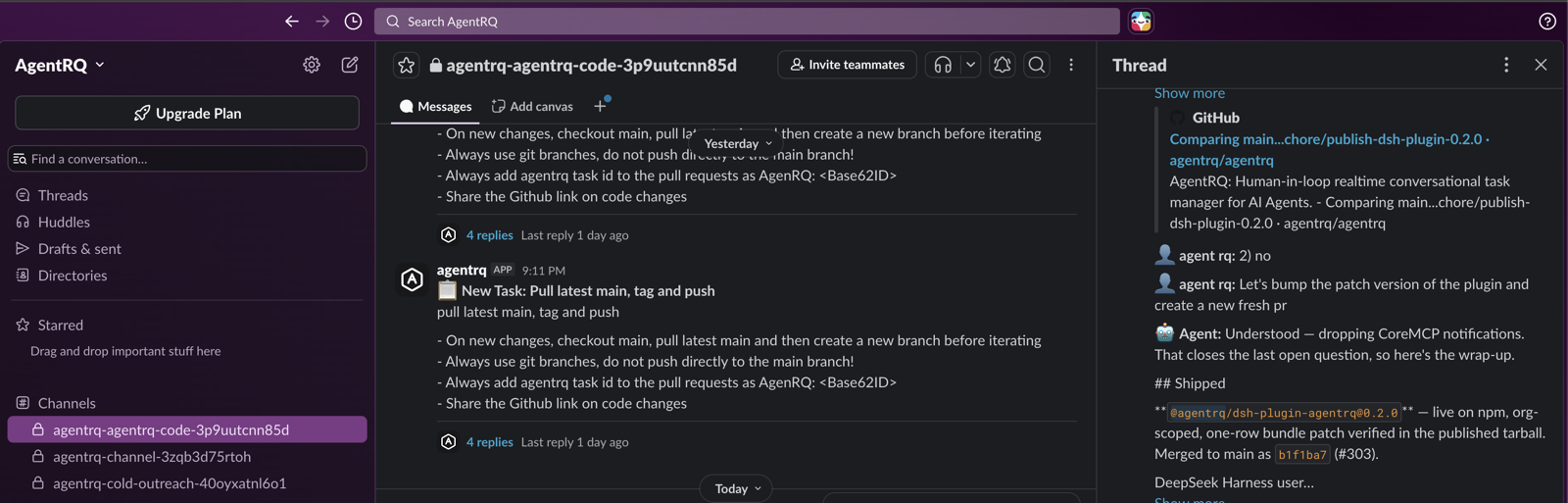
A real workspace channel — every task posted as its own thread, replies and agent output syncing back, the whole team watching the same run.
Connect a workspace to Slack and AgentRQ provisions one private channel for it. Everyone you invite can create tasks, steer agents mid-run, and approve or deny what an agent wants to do — with every action signed by the teammate who took it.
A real workspace channel — every task posted as its own thread, replies and agent output syncing back, the whole team watching the same run.
One authorization by the owner, one channel per workspace, and a normal Slack invite for everyone else.
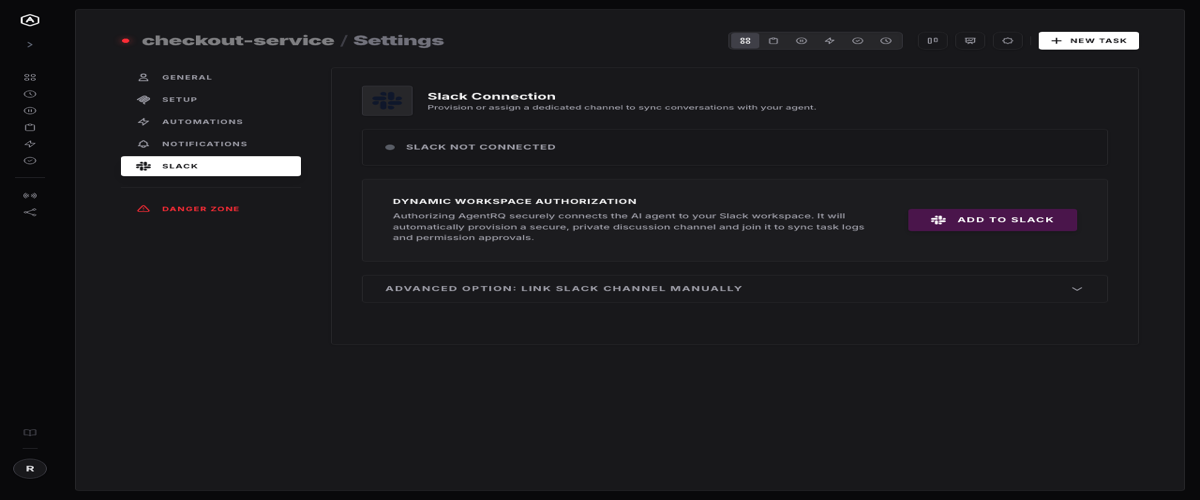
The workspace owner hits Settings → Slack → Link Slack Channel. AgentRQ runs the OAuth
flow, auto-provisions a private channel named agentrq-<workspace>-<id>, joins it,
and invites the installer. No manual channel creation, no bot-invite step to forget.
It's a real private Slack channel, so growing the team is a normal Invite teammates click. No AgentRQ seat to provision, no second login to create. If someone can see the channel, they can work the workspace.
Start work with /t, steer a running task by replying @agentrq in its thread, and settle approvals
with the buttons AgentRQ posts inline. Every one of those is attributed to whoever did it.
The people who need to unblock an agent are usually not the person who filed the task. Slack already knows who they are.
/t "Bump the plugin patch version" "Publish a patch of dsh-plugin-agentrq and open a PR"@agentrq go ahead and merge once CI is greenThis is the part that makes shared use safe rather than merely convenient. Under the hood every Slack-originated action carries the Slack user who sent it, kept separate from the workspace owner's underlying AgentRQ account.
A reply from the channel shows up in the AgentRQ task thread labeled with the teammate who wrote it — not a generic "Slack", and not the owner's name. Approvals carry the same attribution, and it lands in the channel where the conversation happened, not buried in a log somewhere.
The result is a plain, permanent record of who signed off on what, readable by anyone in the room without opening AgentRQ at all.
The hard part of letting a whole team approve things is making sure nobody approves the same thing twice.
When a task needs a decision, AgentRQ posts Allow, Allow All Commands and Reject right in the thread. An MCP tool request gets its own Allow / Deny pair, captioned with the tool being requested.
The moment someone decides, the buttons are replaced by the outcome and the name attached to it. There is nothing left for a second teammate to click five minutes later — no double-processing, no "wait, did someone already approve this?"
A decision made in Slack is flagged on the request itself, so a teammate watching the same task in their browser sees it resolved instead of a stale prompt waiting on an answer that already came.
Each AgentRQ workspace maps to exactly one private Slack channel, and that boundary is the whole tenancy model: a workspace's tasks, replies, and file attachments only ever reach its own channel. Two projects in the same Slack workspace stay cleanly separated.
Leave the channel field blank and AgentRQ provisions one for you. Prefer to run it through a channel you already have? Enter the channel ID and name manually instead — the link is saved either way, and can be removed from the same panel.
Opening a workspace to a team is only worth doing if the door is a real one.
/t, and read mentions of itself.The usual failure mode for shared automation tooling is a shared login. One person owns the account and everyone else either gets a separate setup or borrows the owner's session and hopes nothing collides. Neither option survives contact with a team.
None of this requires a teammate to have opened AgentRQ even once. They need to be in a Slack channel and
they need to know how to type @agentrq. The workspace
context, the task history, the agent doing the work — all of it is already there, running underneath, and
attributed correctly no matter who reaches in to steer it.
That's the actual shape of team collaboration on agent-run work: not a shared login someone hands around, not a separate account per teammate, but one channel the team already lives in, where anyone can act and everyone can see exactly who did.