
How to Enable YOLO Mode in Codex CLI
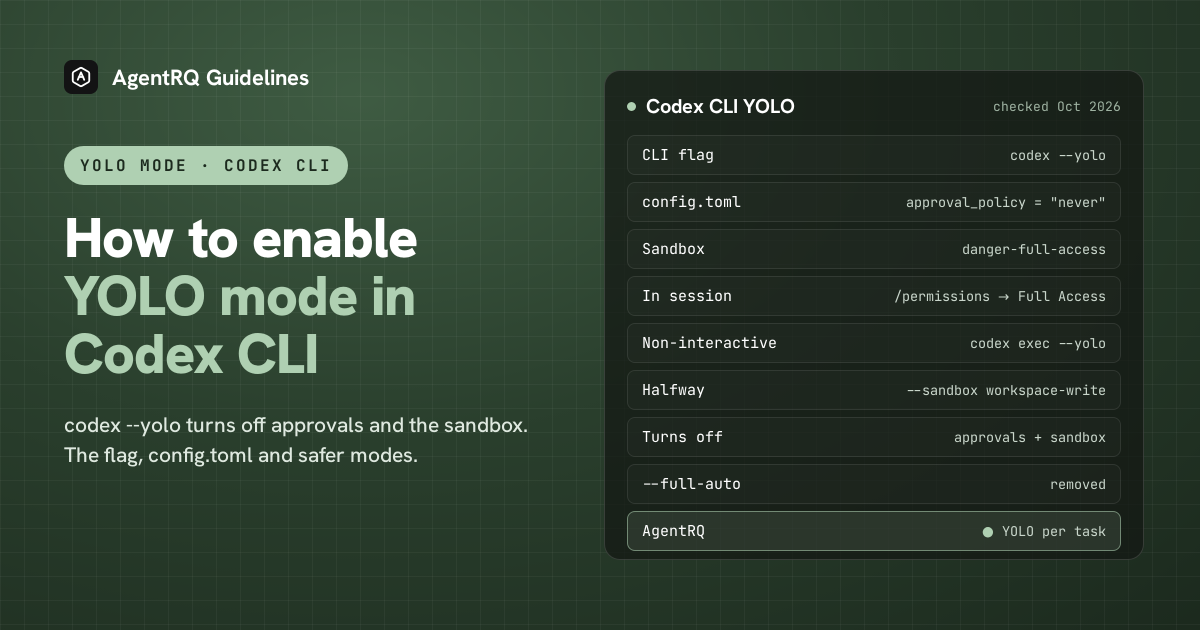
To run OpenAI Codex CLI in YOLO mode, start it with codex --yolo. Codex then runs every command without asking and without its sandbox. That second part is what sets Codex apart from most agents, and it is the reason to read the rest of this page before making it your default.
This page is one of our YOLO mode guides, and part of our guide to YOLO mode in every coding agent. Every flag below was checked against the Codex source (openai/codex, commit 72c9595, release 0.161.0), the Codex ACP adapter (agentclientprotocol/codex-acp 2.1.1) and OpenAI's Codex documentation on October 7, 2026.
What Is YOLO Mode in Codex
Codex has two separate safety layers, and YOLO mode removes both.
- → Approvals. Codex's approval policy decides when it stops to ask you. The default,
on-request, lets the model ask whenever it wants to do something the sandbox would block. - → The sandbox. Codex runs commands inside an operating-system sandbox. The sandbox decides which files a command can write and whether it can reach the network.
codex --yolo sets the approval policy to never and the sandbox to danger-full-access. Commands run with no approval prompt and no isolation, with the same access you have. Codex's own help text calls the flag "EXTREMELY DANGEROUS" and says it is meant for environments that are already sandboxed from the outside.
Every Codex YOLO Flag in One Table
| Flag | Approvals | Sandbox | Notes |
|---|---|---|---|
--yolo |
never | none (danger-full-access) |
Short alias of the next flag. |
--dangerously-bypass-approvals-and-sandbox |
never | none (danger-full-access) |
Identical to --yolo. Also skips the git repo check in codex exec. |
-a never |
never | unchanged | Long form --ask-for-approval never. Interactive CLI only. |
-s danger-full-access |
unchanged (on-request) |
none | Long form --sandbox danger-full-access. |
-s workspace-write |
unchanged | project writable, network off | What most people actually want. |
-s read-only |
unchanged | nothing writable | The default for codex exec and for folders Codex does not trust. |
--approve-for-me |
sent to an automatic reviewer | workspace-write |
Newer flag, in the source but not yet in OpenAI's docs. |
--full-auto |
removed | removed | Use -s workspace-write instead. |
The two dimensions combine freely, and that is where the halfway modes come from:
- →
codex -a never -s danger-full-accessis the same ascodex --yolo. - →
codex -a never -s workspace-writenever asks, but stays sandboxed. A command that needs more than the sandbox allows simply fails, and the error goes back to the model to work around. - →
codex -a on-request -s danger-full-accesshas no sandbox but still lets the model stop and ask. In practice it rarely asks, because nothing is blocked.
On the command line, -a accepts only on-request and never. --yolo cannot be combined with -a, and --approve-for-me cannot be combined with -a, -s or --yolo, because each of them already sets those values.
How to Run Codex in YOLO Mode
The Codex YOLO Mode Command
You can also pass a first prompt straight away:
codex resume --yolo and codex fork --yolo carry the flag into a resumed or forked session.
Make YOLO the Default in config.toml
Codex reads ~/.codex/config.toml (or $CODEX_HOME/config.toml). These two lines make every session start in YOLO mode:
- →
approval_policyacceptson-request(the default),never, or agranulartable that turns individual kinds of prompt on and off.on-failureis still accepted, as another name foron-request.untrustedhas been retired: current builds refuse to start with "approval_policy = "untrusted" is no longer supported; remove this setting". - →
sandbox_modeacceptsread-only,workspace-writeanddanger-full-access. - → Newer builds also have permission profiles.
default_permissions = ":danger-full-access"is the profile form of the sandbox line, alongside:workspaceand:read-only. Whendefault_permissionsis set, it wins oversandbox_mode.
Any key can also be set for a single run with -c, for example codex -c approval_policy=never -c sandbox_mode=danger-full-access.
Keep YOLO in a Profile
A gentler option is to keep YOLO out of your default config and load it only when you mean to. In current builds, codex --profile yolo (or -p yolo) layers a separate file, ~/.codex/yolo.config.toml, on top of your normal config. Put the two lines there:
Then start YOLO sessions with codex -p yolo, and everything else keeps your usual settings. Older versions used [profiles.yolo] tables inside config.toml, selected with a top-level profile = "yolo" key. Those tables still load, but -p now means the separate file.
Tune workspace-write Instead of Going Full YOLO
Most of the friction people try to escape with YOLO comes from two limits of workspace-write: no network, and no writes outside the project. Both can be opened on their own:
- →
network_accesslets sandboxed commands reach the network, sonpm installandpip installwork. It is off by default. - →
writable_rootsadds extra writable folders.--add-dir <DIR>does the same for one run. - →
exclude_tmpdir_env_varandexclude_slash_tmptake$TMPDIRand/tmpout of the writable set when set totrue.
Even in workspace-write, the .git, .codex and .agents folders stay read-only, so Codex cannot rewrite your history or its own config without asking.
Per-Project Trust
The first time you open a folder, Codex asks whether you trust it, and records the answer in config.toml:
A trusted, version-controlled project starts in workspace-write with on-request approvals. A folder that is not under version control, or not trusted, starts read-only. Trust only changes the default. An explicit approval_policy, sandbox_mode or --yolo still wins, so YOLO works in untrusted folders too.
Switch Codex to YOLO Mode Inside a Session
Type /permissions in a running session. It opens a picker with three presets:
| Preset | Approvals | Sandbox | What it means |
|---|---|---|---|
| Read Only | on-request | read-only |
Codex can read the workspace. It asks before editing files or using the internet. |
| Default | on-request | workspace-write |
Codex reads, edits and runs commands in the workspace. It asks before using the internet or editing other files. |
| Full Access | never | danger-full-access |
The YOLO preset. Codex can edit files outside the workspace and use the internet without asking. |
When the Auto-review experiment is on, the picker also shows an Auto-review mode, which sends approval requests to an automatic reviewer. The older /approvals command no longer exists. /approve only retries a single action that the automatic reviewer turned down. There is no default keyboard shortcut for Full Access.
Codex YOLO in the IDE Extension
The Codex extension for VS Code and other editors reads the same ~/.codex/config.toml, so the config above applies there too. We could not confirm the extension's current mode names on an official page, so check the mode picker in the chat panel rather than relying on names from older screenshots.
Run codex exec in YOLO Mode for CI
codex exec runs one task without a chat, for scripts and CI. It never asks for approval, because there is nobody to ask, so the sandbox is the only setting that matters. It has no -a flag for the same reason.
- →
codex execrefuses to run outside a git repository.--skip-git-repo-checkturns that off, and--yoloturns it off too. - →
--jsonprints every event as JSON Lines, and-o <file>writes the final message to a file. - → For authentication, set
CODEX_API_KEYfor that one command. OpenAI advises against exposing it as a job-wide variable in workflows that check out untrusted code.
GitHub Actions
On GitHub, use OpenAI's official action rather than installing the CLI yourself. It keeps the API key behind a proxy and drops sudo before Codex runs:
permission-profile takes :workspace, :read-only or a named profile, and safety-strategy takes drop-sudo (the default), unprivileged-user, read-only or unsafe. A GitHub-hosted runner is a throwaway VM, which is exactly the outside sandbox that --yolo assumes, but the action's workspace profile is usually enough.
Docker and Dev Containers
The safe way to use --yolo on your own machine is inside a container that only sees the project:
Codex can now do anything inside the container, but it only sees the mounted project and the one key you passed in, not your home folder, SSH keys or cloud credentials. In a dev container, put the same npm install -g @openai/codex line in the image or a postCreateCommand, and keep the YOLO lines in a yolo.config.toml profile inside the container rather than in your host config.
The Codex Sandbox on macOS, Linux and Windows
| Platform | Sandbox | Notes |
|---|---|---|
| macOS | Seatbelt, through sandbox-exec |
Built into the OS. Nothing to install. |
| Linux | bubblewrap plus a seccomp network filter | Uses bwrap from PATH, or the copy bundled with Codex. The old Landlock backend is legacy and is refused for filesystem-restricted policies. |
| Windows, WSL2 | The Linux sandbox | Same as Linux. |
| Windows, WSL1 | None | WSL1 cannot create the user namespaces bubblewrap needs, so Codex refuses sandboxed commands there. |
| Windows, native | Codex's own Windows sandbox | Comes in an unelevated and an elevated version. /setup-default-sandbox sets up the elevated one. |
If Linux shows a startup warning that bubblewrap cannot create user namespaces, the sandbox cannot start. That is common inside unprivileged containers, and it is the one case where running --yolo inside a container is the normal setup rather than a shortcut.
What danger-full-access Really Exposes
danger-full-access does not mean "the whole project". It means everything your user account can reach:
- → Every file you can read or write. Your SSH keys, cloud credentials in
~/.awsor~/.config/gcloud, browser profiles, other repositories and your dotfiles. - → The network, without limits. Codex can download and run scripts, call APIs with any token it finds, and send data anywhere.
- → Your git credentials.
.gitis no longer protected, so history can be rewritten, and agit push --forcegoes out with your identity. - → Your environment variables. Anything exported in the shell that started Codex, including API keys, is visible to every command.
A prompt injection hidden in a README, an issue or a web page can steer the model into any of these, and with YOLO on nothing stops it to ask you first.
Troubleshooting Codex YOLO Mode
codex --yolo Is Not Recognized
An "unexpected argument '--yolo'" error means your Codex is too old to know the alias. Check with codex --version and upgrade:
If --full-auto is the flag that fails, that one has been removed on purpose. Use --sandbox workspace-write.
Why Codex Still Asks After YOLO Is On
- → You changed config.toml mid-session. Config is read when a session starts. Restart Codex, or use
/permissionsand choose Full Access. - → You only set one of the two keys.
sandbox_mode = "danger-full-access"alone keepson-requestapprovals, so the model can still stop and ask. - → An admin policy wins. A managed
requirements.tomlcan forbidneverordanger-full-access. Codex then falls back to the allowed default, and only your admin can change that. - → Hooks ask for trust. Hooks need to be trusted once before they run, and
--yolodoes not skip that.--dangerously-bypass-hook-trustdoes, for automation that already vets its hooks. - → You are running Codex through ACP. An ACP client starts Codex in its own mode, so your
config.tomldoes not decide. See the ACP section below.
How to Turn YOLO Off Again
- → For the current session, type
/permissionsand choose Default. - → For a flag, restart Codex without
--yolo. - → For a config default, delete the two lines from
~/.codex/config.toml, or move them into~/.codex/yolo.config.tomlso they only load with-p yolo. - → For one run while your config has YOLO, override it:
codex -a on-request -s workspace-write.
Codex ACP: YOLO and Approvals Over the Agent Client Protocol
What Is codex-acp
Codex CLI does not speak the Agent Client Protocol (ACP) by itself. @agentclientprotocol/codex-acp is the adapter that adds it: a stdio ACP agent server that starts the Codex App Server, turns ACP requests into Codex operations, and sends Codex's events back to the client. That is what lets Zed, JetBrains AIR and other ACP clients run Codex. The project lives at github.com/agentclientprotocol/codex-acp, maintained by OpenAI, JetBrains and Zed, and it is the codex-acp entry in the ACP registry. It started as zed-industries/codex-acp (@zed-industries/codex-acp), which now points new installs to the agentclientprotocol package.
How to Install and Run the Codex ACP Server
Or install it globally:
The package brings its own compatible @openai/codex, so you do not need Codex installed separately. Set CODEX_PATH to use a different Codex binary. It authenticates with your ChatGPT login, or with CODEX_API_KEY or OPENAI_API_KEY. Your ACP client starts it as a subprocess, so in most clients you only enter npx -y @agentclientprotocol/codex-acp as the agent command.
How YOLO Maps Over ACP
Over ACP, the client picks one of four session modes instead of passing --yolo:
| ACP mode id | Name | Approvals | Sandbox | Codex CLI equivalent |
|---|---|---|---|---|
read-only |
Read-only | on-request, asks you | read-only |
-s read-only |
workspace-write |
Workspace access | on-request, asks you | workspace-write |
/permissions Default |
agent |
Auto review | on-request, automatic reviewer | workspace-write |
--approve-for-me |
agent-full-access |
Full access | never | danger-full-access |
--yolo |
- → The default is
agent(Auto review), so Codex over ACP does not ask you about most actions even before you choose YOLO. - → To start in YOLO mode, set
INITIAL_AGENT_MODE=agent-full-accessin the adapter's environment, or switch the mode to Full access in your client. - → To be asked about everything, set
INITIAL_AGENT_MODE=workspace-writeorread-only. - → Each permission request reaches the client as an ACP permission request, and the client shows it however it likes.
- →
CODEX_CONFIGtakes a JSON object that is merged into the session config, for settings such assandbox_workspace_write.
Run Codex ACP Behind the AgentRQ Gateway
The AgentRQ ACP Gateway runs codex-acp for you and connects it to an AgentRQ workspace:
The gateway moves each new session out of any mode that approves on its own, such as Auto review or Full access, and into Read-only. So every edit and command Codex wants to run comes to you as a permission request in the AgentRQ task. YOLO is then decided per task in AgentRQ, as described below. The full setup, including the .mcp.json that points at your workspace, is in the Codex CLI ACP setup guide. Codex used to connect through a separate Codex Gateway, described in the original announcement. That gateway has been retired in favour of codex-acp.
How to Enable YOLO Mode in Codex Through AgentRQ
Codex's own YOLO switch covers a whole session. AgentRQ lets you make the decision per task, and answer from somewhere other than the terminal.
Approve From the AgentRQ Task Instead of the Terminal
Connect Codex through the ACP Gateway as shown above, and each permission request shows up in the AgentRQ task on the web, on your phone or in Slack, together with the command or edit it is asking about. Answer Allow Once, Always Allow or Deny from wherever you are, and Codex carries on. If nobody answers within 30 minutes, the gateway cancels the turn instead of guessing. Change the limit with --permission-timeout.
Turn On YOLO for One Task
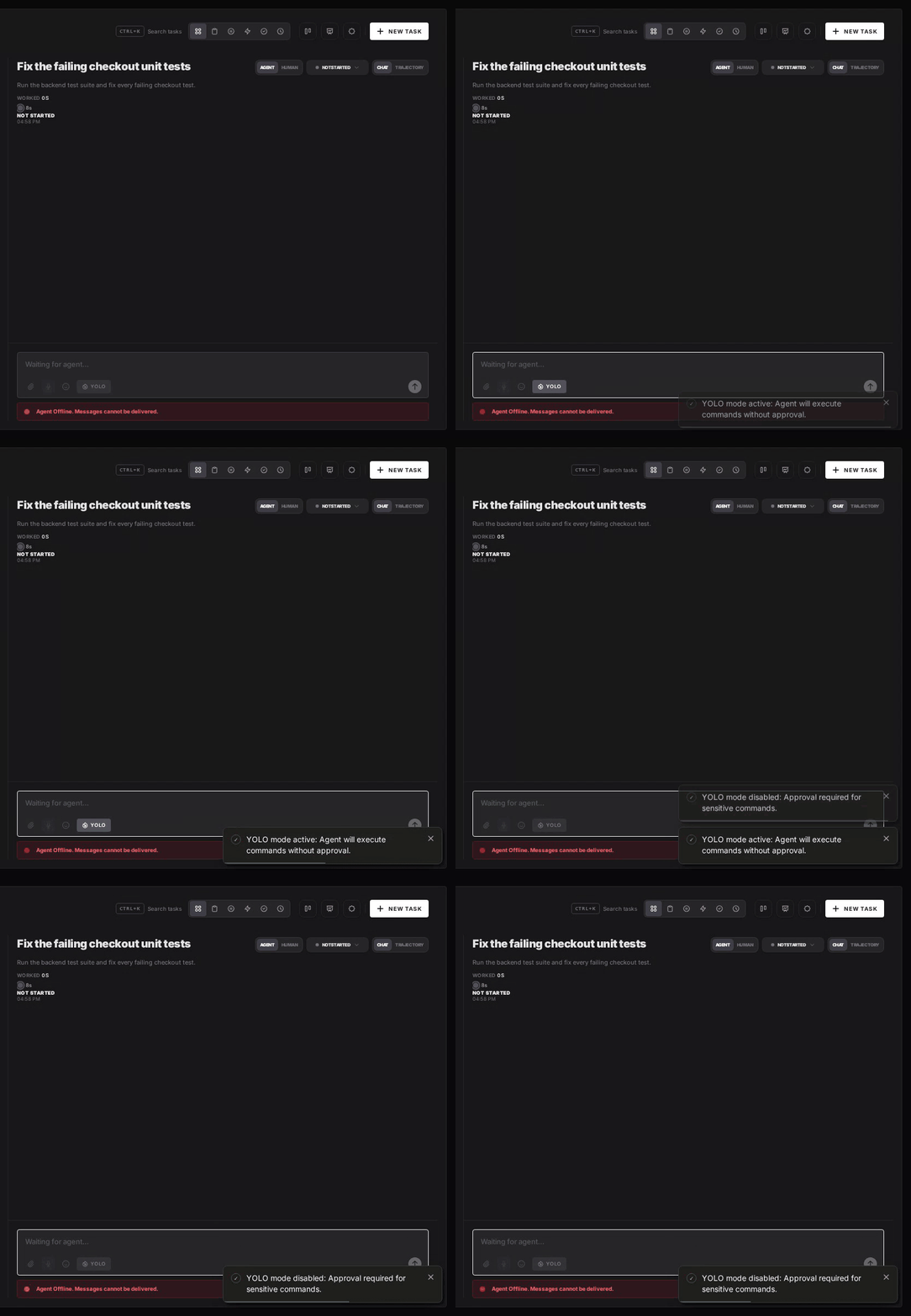
Flip the YOLO toggle on a task, or when you create it, to put just that task in YOLO mode. Every permission request in it is approved automatically and Codex never waits, while every other task in the workspace still asks. Scheduled tasks, event triggers and workflow steps have the same switch, so an unattended job can run in YOLO while your interactive work stays supervised.
Turn YOLO On or Off in Workspace Settings
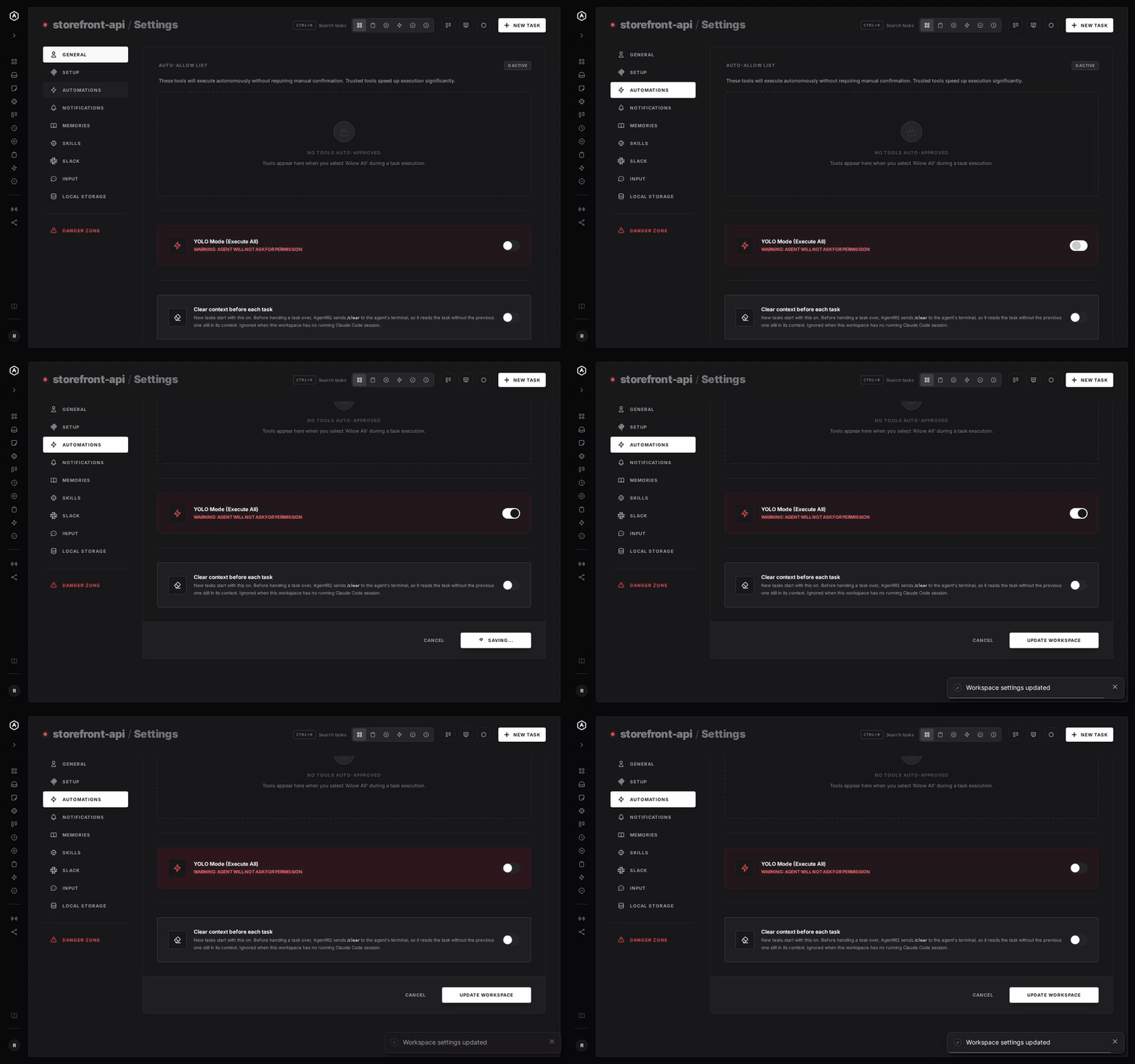
To make YOLO the default for a whole workspace, open the workspace, go to Settings, choose the Automations tab and flip YOLO Mode (Execute All). Click Update Workspace to save. Switch it off the same way. The switch is off by default, and every permission request in the workspace is approved automatically while it is on.
A Worked Example: One Task in YOLO, One With Approvals
Say Codex is connected through the gateway and you create two tasks in the same workspace.
- "Upgrade the test dependencies and fix what breaks", with YOLO on. Codex edits
package.json, runsnpm installand the test suite, and fixes the failures. Every permission request is approved the moment it arrives, so the task runs to the end while you are away. Afterwards, the tool call history lists each command it ran. - "Clean up the staging deploy script", with YOLO off. Codex reads the script and asks to run
./deploy.sh --dry-run. A notification reaches your phone, or a message lands in Slack, and you tap Allow Once. Later it asks to rungit push --force origin staging. You tap Deny and reply that it should open a pull request instead, and Codex carries on with that.
The same Codex, the same workspace and the same gateway, and only the task that needed supervision stopped to ask.
A Safe YOLO Setup for Codex
- → Allow the boring tools, not everything. Always Allow adds the tool to the workspace's auto-approved list, so the routine calls stop asking and the risky ones still do. Prune that list in workspace settings now and then.
- → Leave the workspace-wide switch off. Workspace settings also has YOLO Mode (Execute All). Turn YOLO on per task instead, so it never outlives the job you trusted.
- → Keep the Codex sandbox on. Per-task YOLO in AgentRQ removes the questions, not the sandbox. Codex keeps the sandbox of the mode it is in, so YOLO in AgentRQ never turns into
danger-full-access. - → Commit first. Start every YOLO task from a clean git tree, so any change is one
git resetaway. - → Read the record. The tool call history lists every call the task made, including the ones that were auto-approved.
FAQ
What is Codex YOLO mode? It is Codex CLI running with approvals set to never and the sandbox set to danger-full-access. Codex runs every command without asking you and without any isolation.
What is codex --yolo? It is the short form of codex --dangerously-bypass-approvals-and-sandbox. The two flags are identical.
What is the Codex YOLO mode command? codex --yolo. For a non-interactive run, use codex exec --yolo.
How do I run Codex in YOLO mode? Start it with codex --yolo, or set approval_policy = "never" and sandbox_mode = "danger-full-access" in ~/.codex/config.toml.
How do I start Codex in YOLO mode by default? Put those two lines in ~/.codex/config.toml, or in ~/.codex/yolo.config.toml and start with codex -p yolo when you want it.
How do I enable YOLO mode in Codex CLI without a flag? Use the config lines above, or type /permissions in a running session and choose Full Access.
How do I switch Codex to YOLO mode in a running session? Type /permissions and choose Full Access. The old /approvals command no longer exists.
Does Codex CLI YOLO mode turn off the sandbox? Yes. Unlike Claude Code or Gemini CLI, Codex's YOLO flag removes both the approval prompts and the sandbox. For no prompts with the sandbox kept, use codex -a never -s workspace-write.
Is YOLO Codex safe? Only inside something that is already isolated, such as a container, a VM or a CI runner. On your own machine it can read your keys, use the network and push with your git identity.
Is --full-auto the same as YOLO in Codex? No, and it no longer exists. It used to mean the workspace-write sandbox with fewer prompts. Use --sandbox workspace-write today.
Why does codex --yolo say unexpected argument? Your Codex is older than the alias. Upgrade with npm install -g @openai/codex@latest or brew upgrade --cask codex.
Why does Codex still ask for approval in YOLO mode? Usually the session started before you changed config.toml, only one of the two keys is set, an admin policy forbids never, or a hook is waiting to be trusted.
How do I turn off YOLO mode in Codex? Type /permissions and choose Default, restart without --yolo, or remove the two lines from config.toml.
Can I run codex exec in YOLO mode in CI? Yes, with codex exec --yolo, on a throwaway runner or in a container. On GitHub, openai/codex-action with permission-profile: ":workspace" is usually enough.
Does Codex support ACP? Yes, through the @agentclientprotocol/codex-acp adapter, which turns Codex CLI into an ACP agent server for Zed, JetBrains AIR, the AgentRQ gateway and other ACP clients.
What is codex-acp? It is the Codex ACP server: a stdio adapter that starts the Codex App Server and translates between it and ACP. The current package is @agentclientprotocol/codex-acp, from the agentclientprotocol/codex-acp repository.
How do I install @agentclientprotocol/codex-acp? Run npx -y @agentclientprotocol/codex-acp, or npm install -g @agentclientprotocol/codex-acp and then codex-acp. It brings its own Codex.
Is agentclientprotocol/codex-acp the same as zed-industries/codex-acp? It is the successor. Development moved from zed-industries/codex-acp to agentclientprotocol/codex-acp, and new installs should use @agentclientprotocol/codex-acp.
How do I use YOLO mode with Codex ACP? Choose the Full access mode in your ACP client, or start the adapter with INITIAL_AGENT_MODE=agent-full-access.
How do I approve Codex commands from my phone? Connect Codex to AgentRQ through the ACP Gateway. Its permission requests show up in the task, where you answer Allow Once, Always Allow or Deny.
For every other agent, see what YOLO mode is and how to turn it on in every coding agent, or browse the YOLO mode guides.